Manual Tag Management
Improvement
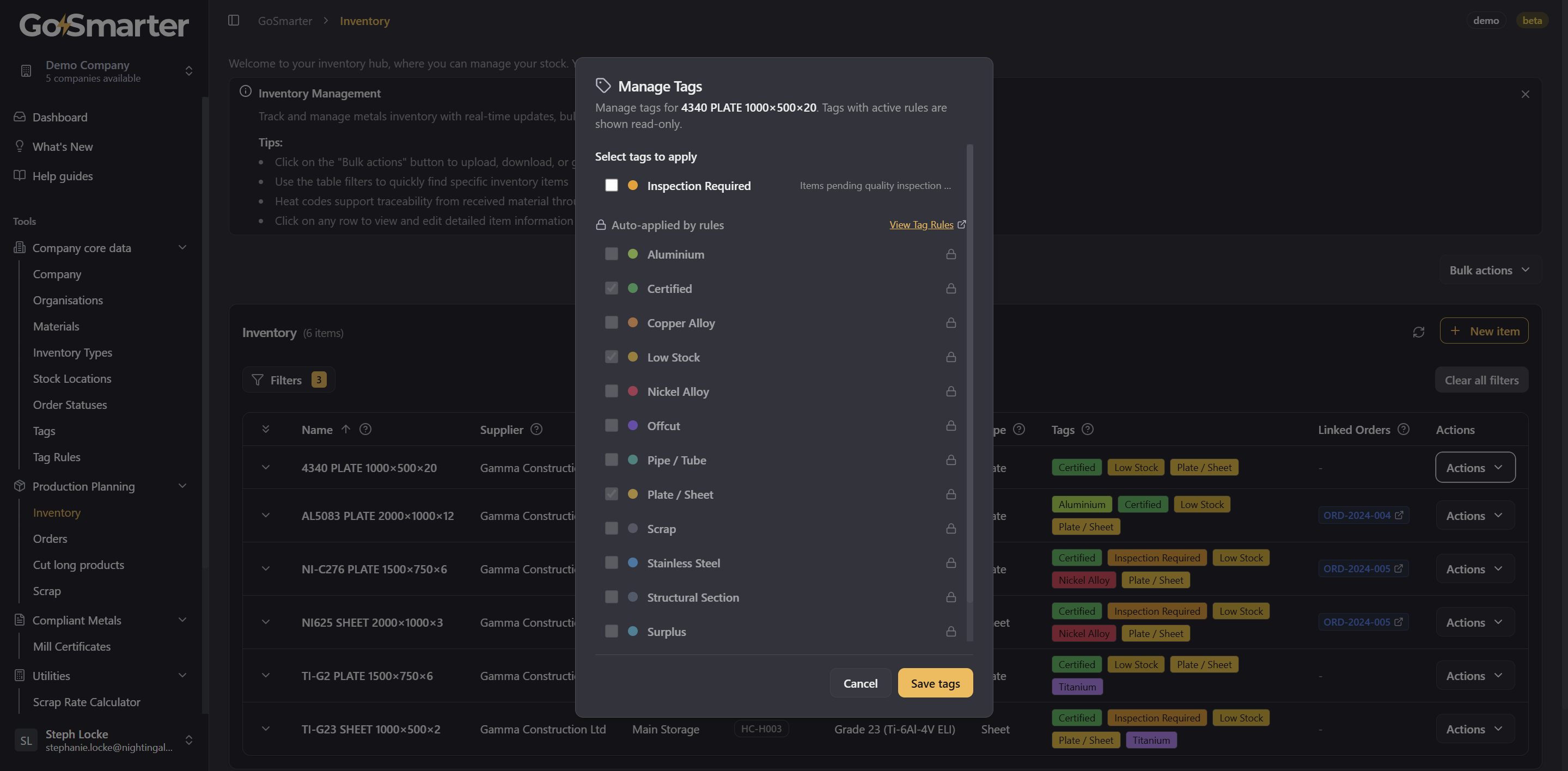
Manage tags directly from your inventory table. You can now manually apply and remove tags on any inventory item without leaving the inventory view. The new "Manage tags" modal replaces the old per-row "Apply tag rules" button, giving you a clearer, more powerful interface for organising your stock.
What's new:
- Open Manage tags from any inventory row to see all available tags for your company in one place. Check or uncheck tags to apply or remove them instantly.
- Tags controlled by active auto-apply rules are shown with a lock icon and marked read-only so you always know which tags are being managed automatically and which are yours to control.
- A "View Tag Rules" link inside the modal takes you directly to the Tag Rules page if you want to change how rules behave.
- Long tag names no longer overflow, they truncate cleanly with a tooltip showing the full name on hover.
- Rule-governed tags are clearly indicated via tooltip on hover or keyboard focus, making the interface fully accessible without a mouse.
Why it matters: Previously, manual tag assignment required working around auto-apply rules, with no visibility into which tags were rule-controlled. Now you get a single, honest view of every tag on an item - what's automatic, what's manual, and how to change either.